🧵 Grain Line Alignment – The #1 Quality Factor
⚠️ Critical: This is the most common reason for low quality scores!
Many players achieve 100% sewing accuracy but still fail quality requirements because pattern pieces aren't aligned to the grain line.
What is Grain Line Alignment?
In real dressmaking, fabric has a "grain" (the direction of threads). Patterns must be aligned with this grain for strength and proper drape. Dressmaker simulates this: each pattern piece has arrows that must point left/right (horizontal) when placed on fabric.
How to Align Properly
- Step 1: Drag a pattern piece onto the fabric in the cutting room.
- Step 2: Rotate the piece (click and drag to turn) until the arrows point left ← → right.
- Step 3: Look for the green outline around the piece. This confirms correct alignment.
- Step 4: If no green outline appears, the piece is misaligned. Keep rotating until you see green.
What Happens if Misaligned?
According to the game developers: "If they don't point that way, your quality score per piece gets capped." This means even perfect sewing won't rescue a dress if pattern pieces are cut off-grain. Each misaligned piece lowers your final quality score.
💡 Pro Tip
Check every single piece before cutting. It's easy to miss one sleeve or bodice panel, which can drop your quality from 80% to 60%.
Visual Reference
Correct alignment: Arrows point → ← (horizontal), green outline visible
Incorrect alignment: Arrows point ↑ ↓ (vertical) or diagonal, no green outline
⌨️ Keyboard Controls Guide
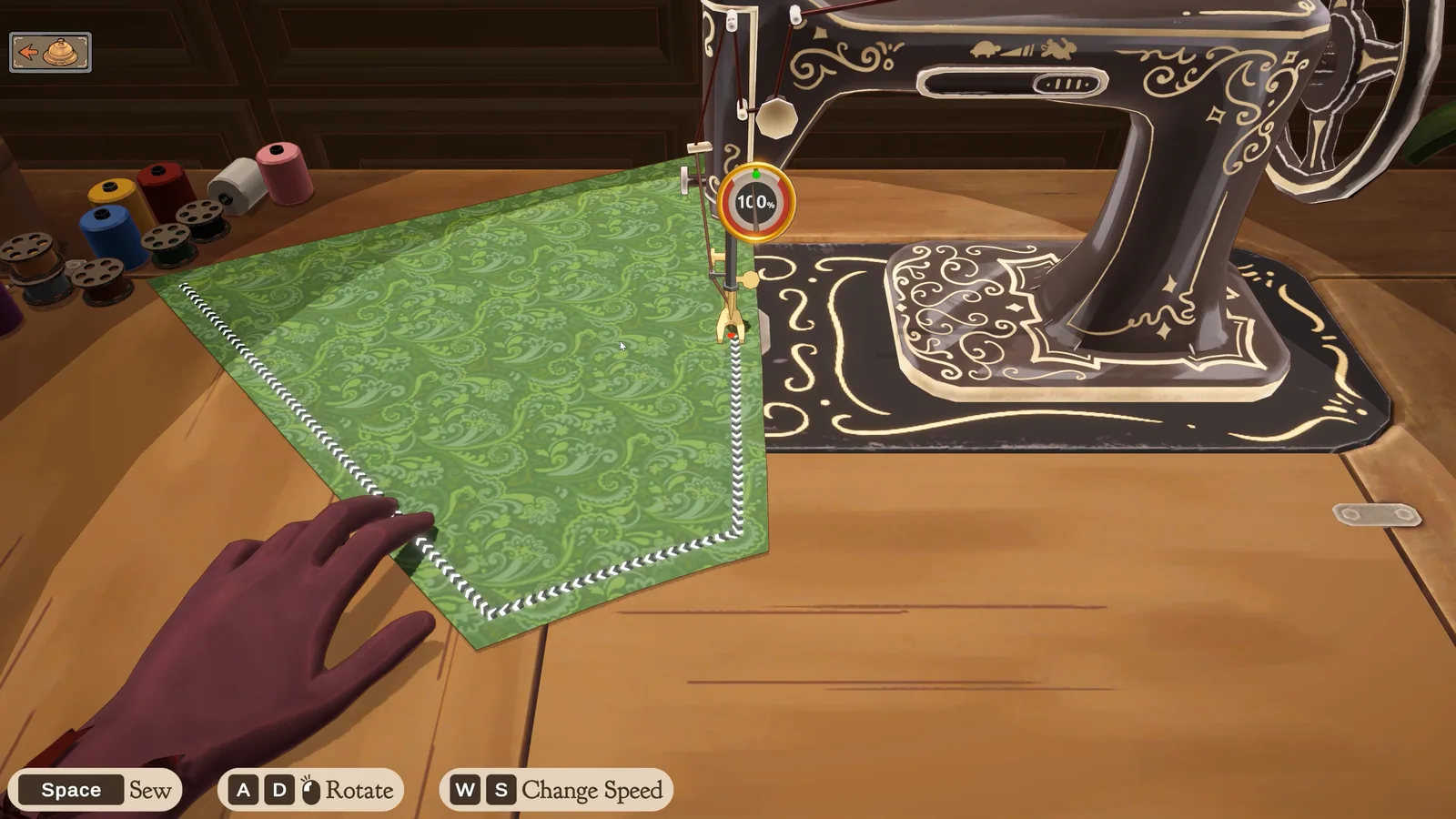
Released-game controls shown in the official screenshot
Space sews, A/D rotate the fabric, and W/S change speed. These are visible defaults from the official full-game image above; the on-screen prompt in your current build is the authoritative control reference.
As of Prototype 0.5.5 (October 3, 2025), Dressmaker supports keyboard controls for sewing, making the process much easier and more precise than mouse-only input.
Controls sewing speed / activates the sewing machine. Press and hold to sew forward.
Rotate/turn the fabric left or right while sewing. Use for curves and corners.
Prototype 0.5.5 Control Setup
Most players find keyboard + mouse hybrid works best:
- Straight seams: Hold Space only, let the machine pull fabric through
- Curves/corners: Hold Space + tap ← or → to adjust angle
- Sharp 90° turns: Stop (Space released), rotate with arrows, resume
Mouse-Only Controls (Alternative)
You can also sew using only the mouse:
- Click and drag forward to sew
- Drag left/right to rotate fabric
Note: Many players report keyboard controls feel more natural and give better results.
How to Change Thread Colour
In the Steam release, open the sewing scene and click a spool to change the thread colour. This control was added in Build 410 on September 24, 2026.
If you cannot find the option, check that Steam has installed the update and that you are in the sewing scene, rather than the sketchbook or decoration view. For a persistent missing control, record your build and a screenshot for the bug report.
The official Build 410 notes ↗ confirm the control. They do not establish that a matching thread colour improves the quality score.
How to Use Sewing Assist
In the released Steam game, look in Settings for Sewing Assist. It helps turn the fabric while you sew; you still need to manage the seam and speed.
- Enable Sewing Assist in Settings, then return to the sewing machine.
- Start slowly and watch the seam beneath the needle.
- Reduce speed or stop before a corner so the fabric can turn. Continue once the next section is aligned.
Assist is useful when manual rotation is difficult, but it does not promise a perfect score or skip the sewing stage. If the line drifts, stop feeding stitches and check the alignment before continuing. For the separate cutting and sewing checks, see the quality-score guide.
These release-week steps come from Seerolz's September 25 player guide ↗. eepy-fox's September 23 report ↗ independently describes assisted turning and the need to slow or stop at corners. Neither names an exact build; follow your current settings and prompts if they differ.
✂️ Sewing Techniques for Better Accuracy
The following seam and accuracy-meter examples describe Prototype 0.5.5. For the released game, use the Space, A/D, and W/S prompts shown above and check the current build's feedback rather than expecting a fixed percentage.
Follow the Dotted Line
When sewing, you'll see a dotted guideline on the fabric. Your goal is to keep the needle (or "hand" icon) on this line. The game displays an accuracy percentage in real-time – aim to keep it at 90-100% throughout each seam.
Technique Breakdown:
-
Straight Seams (Easy):
- Hold Space steadily
- Let the fabric feed through naturally
- Watch the seam and adjust if the needle drifts
-
Gentle Curves (Medium):
- Hold Space continuously
- Make small adjustments with ← or →
- Don't over-correct – tiny taps only
-
Sharp Corners (Hard):
- Stop before the corner (release Space)
- Rotate fabric with arrow keys until lined up
- Resume sewing (Space again)
- Slowing down here is key!
Pacing & Rhythm
One player review noted: "It was still a good reminder to take things slowly and settle into the rhythm before trying to dart onto the next stage." Resist the urge to rush – sewing too fast causes jagged lines and accuracy drops.
⚡ Speed vs. Accuracy Trade-off
The released-game screenshot labels W/S as Change Speed; Space sews. Use the speed prompt shown in your build and slow down before a curve.
When to Use Mouse vs. Keyboard
- • Long straight seams
- • Precise corner turns
- • Reducing hand fatigue
- • Very gentle curves
- • If you prefer tactile control
- • (But most find keyboard easier)
❌ Common Mistakes to Avoid
1. Forgetting to Check Grain Line
Problem: You sew perfectly (100% accuracy) but still get low quality scores.
Solution: ALWAYS verify pattern arrows point left/right before cutting. Look for green outline on every piece.
This is mentioned repeatedly by the developers as the most common quality issue.
2. Rushing Through Corners
Problem: The sewing line goes askew at corners, creating jagged seams.
Solution: Stop completely at corners. In the released-game screenshot, rotate with A/D, then resume sewing. Prototype 0.5.5 used arrow keys; follow your build's prompts.
3. Over-Correcting on Curves
Problem: Fabric rotates too much, causing you to overshoot the dotted line.
Solution: Make small rotation adjustments using the controls shown in your build. The released-game screenshot shows A/D; the prototype used arrow keys.
4. Not Using Keyboard Controls
Problem: Mouse-only sewing feels imprecise and causes hand fatigue.
Solution: In the released-game screenshot, try Space to sew and A/D to rotate. The prototype's Space + Arrow keys were added in update 0.4.4.
5. Ignoring the Accuracy Meter
Problem: You don't notice when accuracy drops below 80%.
Solution: Glance at the percentage display frequently. If it drops to 70-80%, slow down immediately or stop and restart that seam.
🔧 Troubleshooting & Known Bugs (v0.5.5)
The reports below are archived for Prototype 0.5.5. They are not evidence that the same bugs remain in the released Steam build; reproduce the issue in your current version before applying a legacy workaround.
🐛 Bug: Hand/Needle "Twitching"
Symptom: The sewing hand icon shakes or glitches, especially when not actively sewing.
Status: Developers confirmed: "We are aware of the twitchy hands bug but I'm not sure what causes it."
Workaround: Usually visual only – doesn't affect actual quality. Try using keyboard controls instead of mouse to reduce occurrence.
⚠️ Issue: Dotted Line Hard to See
Symptom: On light-colored or patterned fabrics, the green dotted sewing line is nearly invisible.
Affects: Light fabrics (cream, white, pastels) and busy patterns.
Workaround: Zoom in closer (【假设】if zoom is available, or position camera carefully). Sew slowly and rely on the accuracy percentage meter. Some players suggest choosing darker fabrics for easier sewing.
⚠️ Bug: Sewing Line Doesn't Appear
Symptom: Occasionally the dotted guideline doesn't show up on certain pieces (reported on ruffle sleeves).
Status: Multiple players reported this intermittent bug.
Workaround: If this happens, try exiting to main menu and re-entering the sewing phase. Or sew blind (very carefully!) and hope for the best.
💡 If Sewing Feels Impossible
If you're consistently scoring below 60% quality despite following this guide, double-check:
- Are ALL pattern pieces showing green outline? (Not just some)
- Are you using keyboard controls? (Space + Arrows)
- Are you slowing down at curves and corners?
If yes to all and the problem remains, use the current support and community destinations collected on our Official Links page rather than an old invite URL.
📝 Version Notes & Release Status
This Guide is Based On:
- Version: Prototype 0.5.5 (released October 3, 2025)
- Platform: itch.io free prototype
- Status: Archived free prototype; the complete game released on Steam on September 21, 2026
Recent Improvements (Sep-Oct 2025)
- 0.4.4 (Sep 9): Added keyboard controls (Space + Arrow keys) for sewing
- 0.5.1 (Sep 23): Improved sewing sensitivity, added new dress patterns, fixed trim placement
- 0.5.5 (Oct 3): Fixed ruffle skirt panel ordering (latest version as of this guide)
What the Full Game Officially Confirms
The official store page and press-kit screenshot confirm the released-game machine workflow without publishing a universal scoring formula:
- Guide cut pieces through the sewing machine and stitch them together.
- The full-game screenshot shows separate sew, rotate, and speed controls.
- Full controller support is planned post-launch, so it should not be described as available at launch.
- No official source publishes exact score loss per deviation or guarantees that one technique produces 100% every time.
🚀 Full Game Available
View the complete game on the official Steam store page. Use the Prototype 0.5.5 sections only when their controls and UI match what you see.