🧵 Five Fabrics Named by Steam
The official Steam store page ↗ names cotton, linen, wool, silk and velvet as examples of a wide range of fabrics. It does not say there are exactly five material types. Use the shop card in your build to identify a bolt's actual material and tag scores before buying.
⚠️ Important Note
The complete Steam game is now available. The developer has confirmed more than 450 fabrics in the full game, but that figure covers the library as a whole—not 450 base material types. Exact shop stock, prices, tag values, and unlock timing can vary with progression and should be read from your current in-game card.
About Fabric Variety
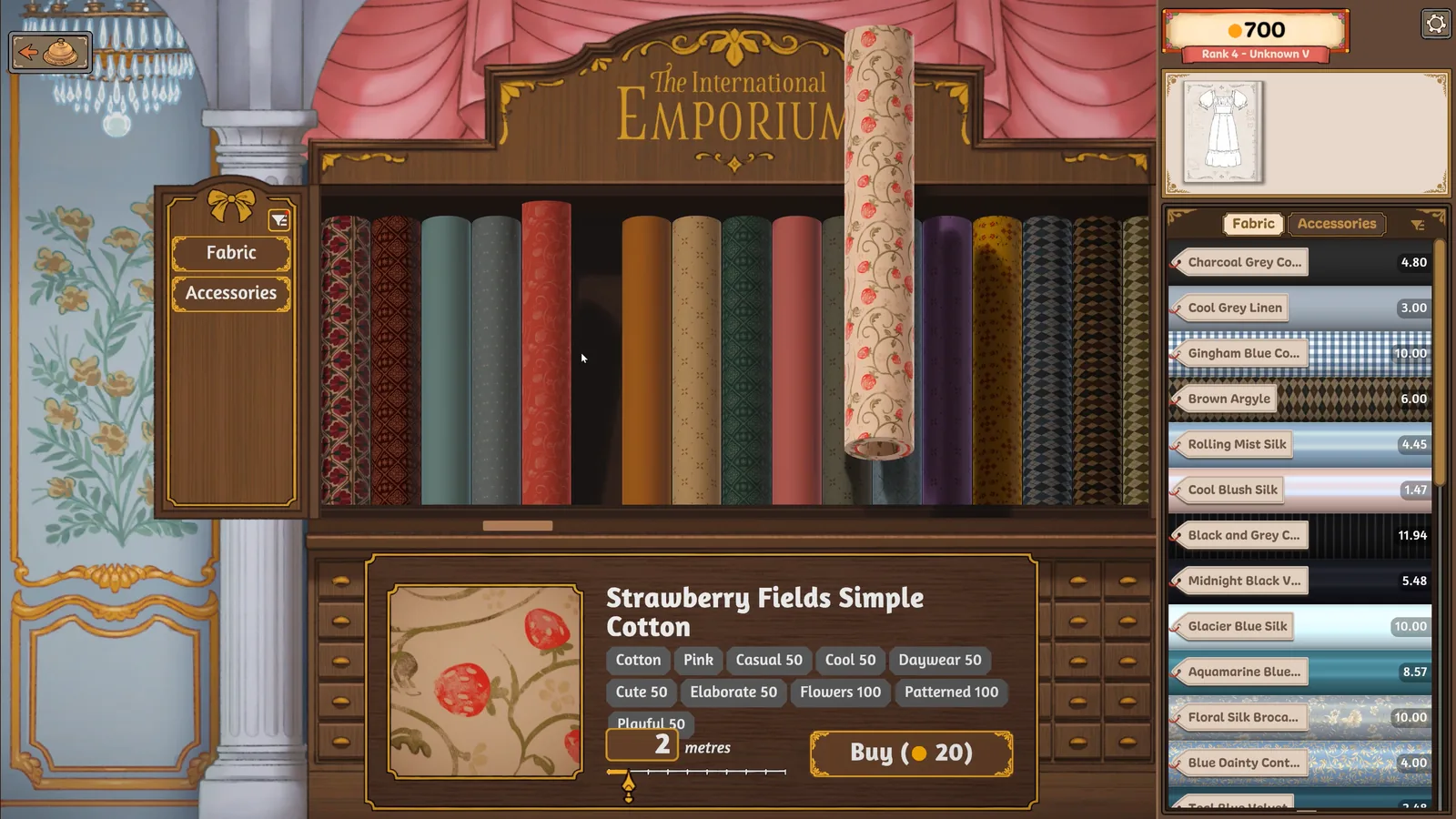
Each type appears in multiple colors and patterns. In the official shop screenshot above, the selected “Strawberry Fields Simple Cotton” card identifies the material as cotton, shows its tag scores, and offers a two-metre purchase for 20 coins. Use that card as a reading example, not as a universal price rule.
The developer's official Steam community announcement gives the full-game scale as 450+ fabrics. A separate launch announcement says small post-release updates will add more fabrics and accessories, while transparent fabrics are planned for a later, larger update. Those are plans, not content already present at launch.
📖 Real-World Fabric Characteristics (For Context)
ℹ️ Informational Reference Only
The information below describes general real-world characteristics of these fabric types. These are not confirmed in-game attributes but may help you understand why certain fabrics might suit certain dress styles. In-game properties may differ from real-world expectations.
🌿 Cotton
General Characteristics: Breathable, comfortable, easy to care for. Widely used for everyday wear.
Typical Uses (Real World): Casual dresses, workwear, summer clothing, daywear
Common Styles: Relaxed, practical, approachable
🌾 Linen
General Characteristics: Lightweight, breathable, natural texture. Known for a relaxed, slightly rumpled appearance.
Typical Uses (Real World): Summer dresses, casual elegant wear, vacation clothing
Common Styles: Relaxed elegance, natural, effortless
🐑 Wool
General Characteristics: Warm, structured, holds shape well. Provides good insulation.
Typical Uses (Real World): Professional wear, winter dresses, tailored garments
Common Styles: Professional, structured, sophisticated
✨ Silk
General Characteristics: Luxurious, smooth, natural sheen. Drapes beautifully and feels elegant.
Typical Uses (Real World): Formal dresses, evening wear, special occasion garments
Common Styles: Elegant, luxurious, refined, romantic
🎭 Velvet
General Characteristics: Rich texture, deep color saturation, dramatic appearance. Associated with luxury and formality.
Typical Uses (Real World): Evening gowns, opera attire, winter formal wear, dramatic designs
Common Styles: Glamorous, dramatic, formal, opulent
💡 Fabric Selection Strategy
Find and Buy Fabric in the Steam Release
- Start with the draft: Note which required style attributes still need improvement.
- Narrow the shop selection: In the Emporium's fabric view, use the available filters to find materials for those attributes.
- Read the selected card: Check the fabric name, colour, material and tag values. Filtering helps find candidates; the card confirms what you are buying.
- Check quantity and cost: Read the metres and purchase total before pressing Buy. Keep money available for the other pieces and accessories in the order.
The official shop image above shows the card, quantity and Buy total together. Its two-metre, 20-coin selection is an example for that fabric, not a price rule for the whole library.
Need more of a fabric you already own? Seerolz's player guide credits SilverLyrics with a shortcut: select the fabric in your inventory to bring it up for another purchase. Check the resulting card; if your build does not select it, use the shop filters instead.
Before choosing how much to buy, use the fabric budget checklist to group the pattern pieces and leave a reserve for corrections.
Filtering is described in the Into Indie Games launch walkthrough ↗ and Seerolz's September 25 guide ↗. The inventory shortcut is a player-reported method from the latter, whose exact build is not stated.
Prototype v0.5.5 Selection Process
-
1. Read Customer Request Carefully
Note the occasion (work, ball, garden party) and any style descriptors ("elegant," "cute," "professional")
-
2. Check Budget Constraints
Each customer has a fixed budget. Remember this when shopping.
-
3. Design First, Shop Second
Create your dress pattern in the sketchbook before visiting the fabric shop
-
4. Use the Tag Preview System
Drag fabric samples into your sketchbook to see tags before committing to a purchase
-
5. Match Tags to Request
Choose fabrics whose tags align with customer preferences
-
6. Consider Fabric Combinations
You can use different fabrics for bodice, skirt, and sleeves to combine multiple tag effects
Budget Management Tips
- The game does not show a universal total fabric requirement upfront, so plan fabric groups before shopping. See the Fabric Budget Guide for a safer buying workflow.
- Consider mixing fabrics: use one material for the most visible piece, a simpler one for others
- Efficient pattern placement during cutting saves material (and money)
- There's no undo system – plan carefully to avoid overspending
Prototype UI Limitations
The following notes describe the Prototype v0.5.5 shopping workflow and should not be assumed to describe every full-game menu:
- Prototype tag filtering – The v0.5.5 workflow below relies on checking samples manually; this is not a limitation of the released Steam game's Emporium.
- Fabric swatch preview – Being able to see all fabrics at once in a color palette view
- In-shop tag display – Seeing tags directly in the shop without dragging into sketchbook
In the Steam release, use the filter-and-card workflow above. The prototype notes do not describe every current menu, stock item or unlock condition.
⚠️ Common Fabric-Related Issues
Can't Find Fabrics with Specific Tags
Problem: You need a "cute" fabric but can't identify which ones have that tag.
Steam release: Use the Emporium filters for the missing attribute, then check the selected fabric's tag values and purchase cost. Follow the buying steps above.
Prototype v0.5.5: Preview different fabric samples in your drafted dress. Its tag-preview workflow combines fabric and pattern choices; do not assume the old shop limitations apply to the Steam release.
Forgot to Check Tags Before Buying
Problem: You purchased fabric without checking tags and now it doesn't match the customer request.
Solution: In the prototype, there's no undo for purchases. You may need to restart the dress (or entire game session). Always check tags in sketchbook before buying.
Ran Out of Budget Mid-Project
Problem: You overspent on fabric and can't afford accessories or additional materials.
Solution: Plan your budget before shopping. Draft the dress first, group pattern pieces by fabric, and keep a reserve for extra pieces or corrections. See the Fabric Budget Guide for the full checklist.
Tags Don't Seem to Match Customer Preferences
Problem: You matched the tags but the customer still isn't satisfied.
Possible causes:
- Quality score may be low due to grain line misalignment or poor sewing
- Budget may have been exceeded
- Some customers may have specific unstated preferences
See our Sewing Mastery Guide for quality tips.
📝 Version Boundaries & Official Status
This Guide is Based On:
- Full game: Released on Steam on September 21, 2026 for Windows and macOS
- Confirmed scale: More than 450 fabrics in the complete game
- Prototype reference: itch.io Prototype 0.5.5 for the detailed tag-preview and legacy troubleshooting steps
- Primary sources: Official Steam store page, official Steam community announcements, and the developer's itch.io devlogs
Confirmed Post-Launch Direction
The official “Out Now” announcement separates near-term additions from longer-term work:
- Near term: small bug-fix updates with a sprinkling of new fabrics and accessories
- Later work: transparent fabrics, which require additional rendering work for layered, double-sided meshes
🚀 Full Game Available
Buy or view the complete game on the official Steam store page. The free itch.io prototype remains a separate historical build and should not be used to infer the full game's entire fabric catalog.
📚 Related Guides
Learn which customers prefer which style tags
Estimate fabric needs, preserve budget, and avoid wrong purchases
Match bodice, sleeve, skirt, and collar pieces to your planned fabrics
Complete beginner's guide to the full gameplay loop